How to Fill GAMCA Medical Registration Form Online (Step-by-Step Guide 2026)
Filling out the GAMCA medical registration form online is a crucial step for anyone planning to work in Gulf countries such as Saudi Arabia, UAE, Qatar, Kuwait, Oman, or Bahrain. Even a small mistake in the GAMCA medical application form can lead to rejection or delays.
This 2026 guide explains how to fill the GAMCA medical form correctly, step by step, using the latest process.
What Is the GAMCA Medical Registration Form?
The GAMCA medical registration form is an online form used to book an appointment at GAMCA-approved medical centers. It collects personal and passport details to verify an applicant’s medical fitness for Gulf employment.
Documents Required for GAMCA Medical Registration
Before starting the GAMCA medical online registration, keep these ready:
- Original Passport (valid for at least 6 months)
- Passport number & expiry date
- Destination country
- Active mobile number & email
- Prepare online payment for GAMCA medical appointment fee (debit/credit card or online payment option)
Step-by-Step Guide to Fill GAMCA Medical Registration Form Correctly
Step 1: Visit Authorized GAMCA Medical Booking Website
Access the official or authorized GAMCA medical booking portal to start the registration.
Appointment
Avoid fake websites that offer cheap bookings. Now are on the website’s appointment page.
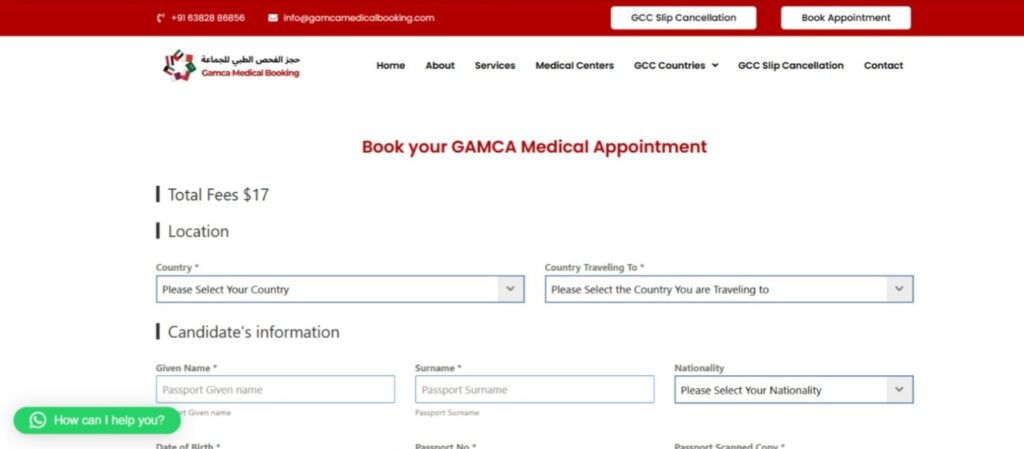
Step 2: Select Medical Country and City
Select the country and city where you want to complete your GAMCA medical test. Based on your selection, the system will generate GAMCA-approved medical centers in your location.
Choosing the correct medical country and city for GAMCA booking helps you get a nearby clinic, faster appointment, and smooth medical process.
Step 3: Select Your Destination Country
Choose the correct Gulf country:
- Saudi Arabia
- United Arab Emirates (UAE)
- Qatar
- Kuwait
- Oman
- Bahrain
The GAMCA medical test differs by country, so select carefully.
Step 4: Enter Personal Details (Most Important Step)
Fill details exactly as per passport:
- Full name
- Passport number
- Nationality
- Date of birth
- Gender
- Passport Issue & Expiry Date
- Your medical profession
Important: Even a single spelling error can cause GAMCA medical rejection.

Step 5: Pay GAMCA Medical Appointment Fee
Complete payment online. The GAMCA medical appointment fee is USD 17/1300 Rs.
- Secure online payment
- No hidden charges
- No cash payment required
After payment, your appointment will be confirmed.
Step 6: Automatic Medical Center Allocation
Medical center selection is not allowed.
- The GAMCA system automatically assigns a medical center
- Applicants cannot choose or change the center
- Centers are GAMCA-approved and system-authorized
Step 7: Appointment Confirmation & Slip Sent by Email
After successful online payment, your GAMCA medical appointment will be booked automatically. The GAMCA appointment slip will be generated and sent to your registered email address instantly.
Please download or print the appointment slip and carry it along with your original passport on the medical test date
Common GAMCA Medical Form Mistakes to Avoid
Applicants must carry the following documents on the appointment day:
- Wrong passport number
- Selecting incorrect destination country
- Select wrong medical city
- Name mismatch with passport
- Submit inactive email id or Whatsapp Number
Can We Correct GAMCA Medical Registration Form After Submission?
Once the GAMCA medical appointment slip is generated, no changes can be made from our side. All details submitted during registration are locked in the system.
How Can Errors Be Corrected?
If there is any mistake in the GAMCA medical registration form (such as name, passport number, or date of birth):
- A correction request must be sent to the selected GAMCA medical center
- The medical center may approve or reject the correction request
- Approval depends entirely on the medical center’s policy
What If the Medical Center Rejects the Correction?
If the medical center does not accept the correction request:
- The existing GAMCA appointment slip must be cancelled
- A new GAMCA medical booking must be made with correct details
This ensures there are no issues during the medical test or visa process. For more information, please visit: GAMCA Medical Slip Cancellation Page and How to Correct Mistakes in GAMCA Appointment Slip – Complete Guide
Important Notes for Applicants
- Always verify all details before final submission
- Once slip is generated, details cannot be edited online
- Incorrect information may lead to medical rejection or delay
To avoid cancellation and rebooking, we strongly recommend double-checking all details before payment. Accurate information ensures a smooth GAMCA medical process.
Frequently Asked Questions
Visit an authorized GAMCA booking website, select medical country and city, enter passport details correctly, pay the fee, and download the appointment slip.
A valid passport, passport details, destination country, and an online payment method are required for GAMCA medical online registration.
No. Once the appointment slip is generated, details cannot be edited online. Corrections must be requested from the medical center or require rebooking.
After successful payment, the GAMCA medical appointment is booked and the appointment slip is sent to the registered email address.
The online GAMCA medical registration process usually takes 5–10 minutes if all details are entered correctly.
Wrong passport number, name mismatch, selecting incorrect medical country or city, and spelling errors are the most common mistakes.
Final Words
Knowing how to fill the GAMCA medical registration form correctly can save time, money, and stress. Follow this step-by-step GAMCA medical registration guide for 2026 to ensure a smooth medical process.
Filling the GAMCA medical registration form online correctly is very important to avoid mistakes, delays, or cancellation. Always enter your details exactly as per your passport and double-check everything before making the payment.
If you are not sure how to book the GAMCA medical appointment, don’t worry – we can help you. You can book your appointment easily through WhatsApp. Simply send us a passport copy, share the required details, and complete the online payment. We will book the appointment on your behalf and send you the GAMCA medical appointment slip to your registered email.
This way, you can avoid errors and complete your GAMCA medical process smoothly and confidently.
For appointment-related assistance or clarification regarding the booking process, applicants may contact: